Google Sheets and Apps Script as a Control System: Cheque Validation and File Tracking
Two small portals, one lesson: don't just digitize data entry, build controls into the process. How I used Google Sheets and Apps Script for cheque validation and file tracking.
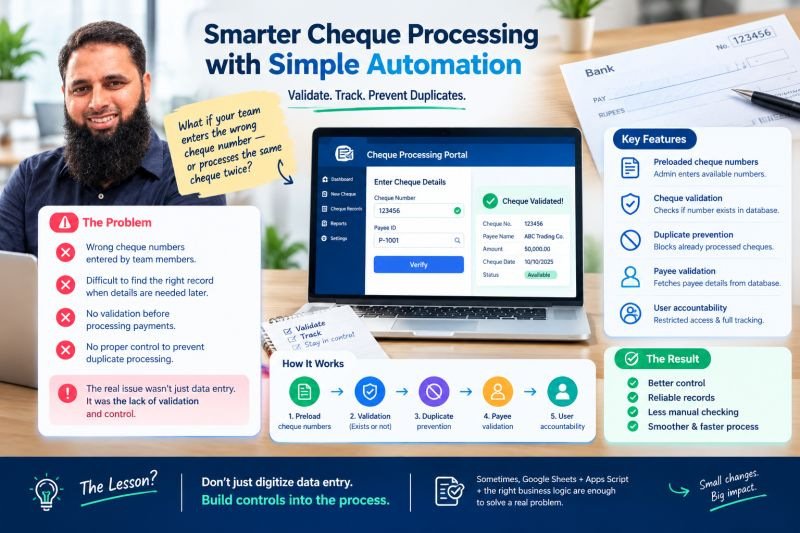
The visual I shared with the original LinkedIn post.
Controls, not just forms
Two client problems looked small. Both needed the same thing: validation and visibility. Neither needed enterprise software. Both were solved with Google Sheets as the database and Google Apps Script for the application.
Portal 1: cheque processing
What was going wrong: wrong cheque numbers were sometimes entered, finding a cheque record later was difficult, there was no validation before payment, and nothing prevented the same cheque being processed twice.
What I built:
- Preloaded cheque numbers. The admin enters available numbers in advance.
- Validation. If a number isn't in the database, processing cannot continue.
- Duplicate prevention. An already processed cheque shows a message and is blocked.
- Payee validation. The user enters the payee's unique ID and the system fetches the details.
- Accountability. Access is restricted and the system records who processed each cheque.
Portal 2: file tracking across HR, Accounts and Audit
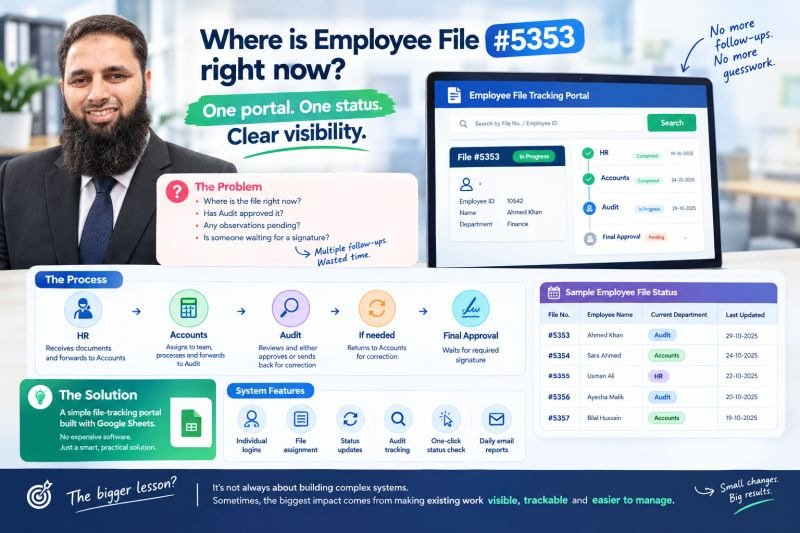
Employee clearance files moved between three departments, sometimes returning for audit observations or waiting for a signature. The process existed, but nobody could see a file's current status, so people kept asking colleagues.
The portal offers individual logins, file assignment, status updates, audit tracking, a one-click status check and daily email reports.
The lesson
The real issue was never the typing. It was the lack of validation, control and visibility. Before building anything I ask: what is the actual problem people are spending time on? In the file case it wasn't processing the files. It was finding out where they were.
If this is useful, see my playbook for automating repetitive finance work.
I first shared this on LinkedIn. If you have a similar problem in your own team, connect with me on LinkedIn and let's talk.
Enjoyed this post?
Follow my journey from finance ledgers to one-click automation.