How I Automated FBR IRIS NTN Verification with Python (30 Minutes to One Click)
A friend in a tax department was spending half an hour verifying 20 NTN/CNIC records by hand on the FBR IRIS portal. Here is how a small Python tool turned it into a single click.
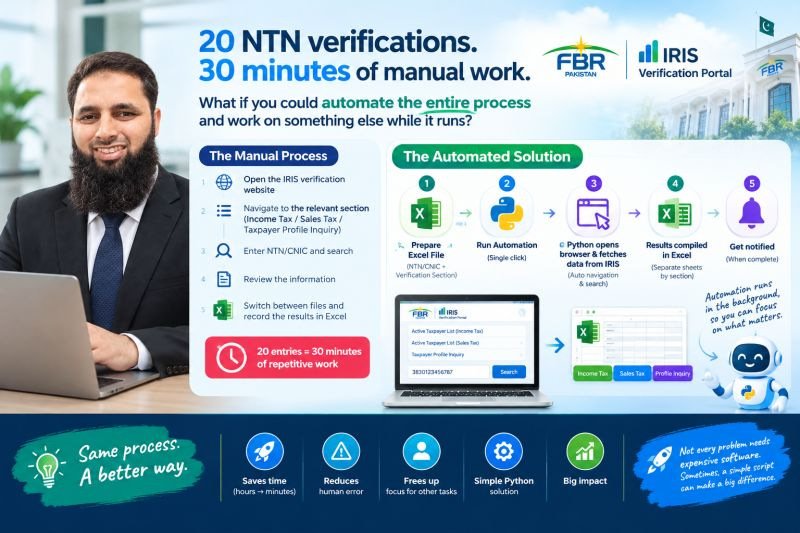
The visual I shared with the original LinkedIn post.
The problem: 20 records, 30 minutes, zero focus
A friend of mine works in the tax department of a large company. One day he described a task that quietly eats his week: verifying NTN and CNIC records on Pakistan's FBR IRIS verification portal.
For every single entry he had to:
- open the IRIS verification website,
- find the right section: Active Taxpayer List (Income Tax), Active Taxpayer List (Sales Tax) or Taxpayer Profile Inquiry,
- type the NTN or CNIC and search,
- read the result, and
- switch to Excel and write it down.
Do that for 20 entries and you have burned roughly 30 minutes of pure repetition. Worse, you cannot do anything else while it happens, because every search needs your hands and eyes.
He asked me whether there was a better way. My answer was the question I now ask about almost every repetitive job:
Why should a person run every search when the whole workflow can be automated?
What I built
I put together a small Python tool that does the clicking for you. The idea is deliberately simple: Excel in, Excel out.
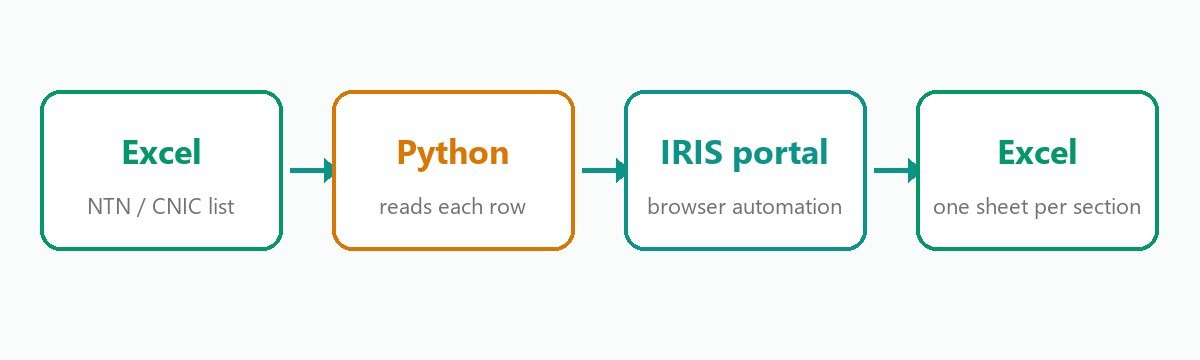
- Prepare the input. One Excel file. NTN/CNIC numbers in the first column, the verification section you need in the second.
- Run it with one click. No command-line knowledge needed for the person using it.
- Python drives the browser. It opens the IRIS portal, goes to the right section for each row, enters the number and reads back the information that is available.
- Results land in Excel. The output file has a separate sheet for each verification section, so the data is already organised the way a reviewer wants it.
- You get notified when it is done, and in the meantime you are free to work on something that actually needs your brain.
Why "Excel in, Excel out" matters
Finance and tax people already live in Excel. If a tool asks them to learn a new interface, it dies in a week. If it takes the file they already have and hands back the file they already need, it gets used on day one.
That is the whole design philosophy behind most of the automation I build at work: keep the human in the tools they know, and delete the boring middle.
What I learned
- Start with one painful, repeatable task. Not "automate tax", but "verify these 20 numbers".
- Always keep a human review step. The bot collects; a person still decides.
- Log everything. When a portal is slow or a record is missing, a clear log saves hours of guessing.
- Small tools beat big projects. This took a fraction of the time an ERP change request would, and it solved the exact problem.
If you work in tax, finance or compliance and recognise this kind of copy-paste routine in your own week, it is almost certainly automatable. I originally shared the story on LinkedIn and the conversation there was great; if you want to talk through your own process, connect with me on LinkedIn.
Automation here means reading public verification results more efficiently, always within the portal's own terms and with a person responsible for the outcome.
Enjoyed this post?
Follow my journey from finance ledgers to one-click automation.